
Parts of a Computer: Monitor, Keyboard, Mouse, and CPU
How to use: Print the PDF before you call your child. Read the lesson once together and talk it through, then the exercises on paper. Correct together with the answer key and the Parent checklist. The next day, your child redoes this lesson here on screen (about 10 minutes) to review it and save progress.
Learning Objectives
- 1Name the main parts of a computer — monitor, keyboard, mouse, and CPU
- 2Describe what each one does
Mini Lesson
A computer is a machine that helps us write, draw, watch, learn, and communicate. But a computer is not just one thing — it is made of several parts, and each part has a special job!
The monitor
- The monitor is the screen that shows you everything the computer is doing.
- It is an output device — it gives information OUT to you.
- Example: When you type a letter, it appears on the monitor screen.
The keyboard
- The keyboard has rows of keys with letters, numbers, and symbols.
- You press the keys to type words and give instructions to the computer.
- It is an input device — you put information IN to the computer.
The mouse
- The mouse is a small handheld device that controls a pointer on the screen.
- You move it to point at things, and click its buttons to select or open them.
- Like the keyboard, it is an input device.
The CPU — the brain of the computer
- CPU stands for Central Processing Unit.
- It is the part inside the computer (often inside the tower or the screen) that processes all instructions and runs every program.
- Think of the CPU as the computer’s brain — nothing works without it.
Other parts you may see
- Speakers — output sound and music.
- Printer — outputs text and images onto paper.
- Storage — saves files and programs (hard drive or USB).
Ask yourself: "If I look at the computer in front of me, can I point to the monitor, the keyboard, the mouse, and the CPU?"
Guided Practice
Pick a word from the Trace menu and pass over the ghost letters with your finger or pen. Tap 🔍 Bigger for a fullscreen practice canvas.
Tip: After writing each part name, draw a quick arrow from the word to its location on your diagram — labeling diagrams is a key tech skill!
Exercises
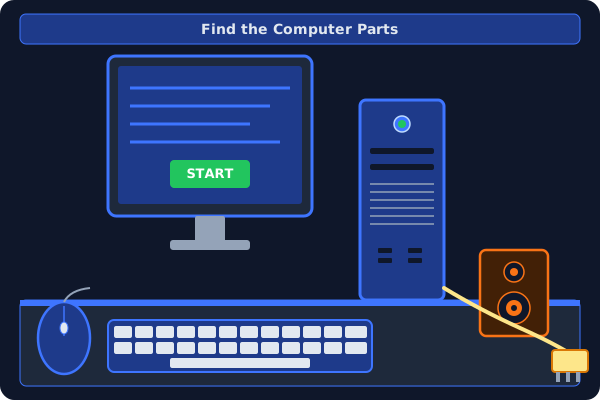
Tap each computer part on the diagram when its name is called. Find every part!
Tap the Keyboard
0 / 6 found · Look at the dashed boxes — tap the right one.
1. What does the monitor do?
2. What is a keyboard used for?
3. What does CPU stand for?
4. What does the mouse control?
5. Which of the following is an input device?
6. Which of the following is an output device?
7. Why is the CPU called the brain of the computer?
8. What is computer hardware?
9. What does the computer speaker do?
10. What is a computer?
Parent Checklist
For the parent: after correcting together, check off what your child has really understood